Product Photography Tips for Better Online Sales
Posted On: August 4, 2026
Reading Time: 8 min read
Share:


Keep Up with Marketing Trends
Get the weekly newsletter
Picture this. A shopper is scrolling through an online store, phone in hand, thumb moving fast. They stop on one product, not because of the price, but because the photo actually looks good. That pause is where a sale either happens or slips away.
Online shoppers cannot touch, hold, or try your product before buying it. Your photos are doing all that work instead. If they look dull, dark, or inconsistent, shoppers move on without a second thought. If they look sharp, clear, and trustworthy, shoppers stay a little longer and lean closer to buying.
This guide walks through practical, easy to apply product photography tips that help small businesses and online stores turn browsers into buyers, without needing a professional studio setup for every single shot.
Product Photography Tips for Better Online Sales
1. Plan Before You Shoot
Before you pick up a camera, decide what story each photo needs to tell. Are you showing the whole product, a close up detail, or how it looks in use? Write a simple shot list for every product so nothing important gets missed during the shoot.
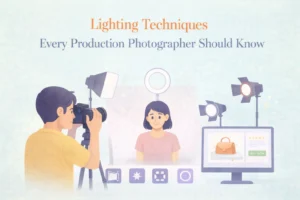
2. Get the Lighting Right
Lighting can make an average product look premium, or a great product look cheap. Natural window light works well for many small products, but a basic softbox or ring light gives you more control and consistency across an entire catalogue. Avoid harsh shadows and mixed light sources, since they tend to distort true colours.
3. Choose the Right Background
A clean, uncluttered background keeps attention on the product itself. Plain white or light neutral backgrounds work well for most online marketplaces, while a styled background with props can work nicely for lifestyle shots on social media or your homepage. Just make sure the background never competes with the product.
4. Show Multiple Angles
One photo rarely tells the full story. Shoppers want to see the front, back, sides, and any unique features before they commit to buying. A short set of four to six angles gives online buyers the confidence that comes naturally with holding a product in person.
5. Focus on Details That Matter
Zoom in on stitching, texture, buttons, packaging, or any small detail that shows quality. These close ups build trust because they prove there is nothing to hide. They also help set the right expectations, which keeps return rates lower.
6. Keep Sizing and Scale Clear
Size confusion is one of the biggest reasons shoppers hesitate or return items. Include a photo that shows the product next to a familiar object, on a model, or with clear dimensions in the caption, so there are no surprises after checkout.
7. Edit for Consistency, Not Perfection
Light editing helps correct colour balance and crop images to a consistent size, but avoid over editing to the point where the product looks unrealistic. Consistency across your whole store matters more than making a single photo look flawless. This is also where a bit of graphic design support helps, especially when you are laying out banners or catalogue style pages that use these photos together.
8. Optimise Images for Web and Mobile
A stunning photo is wasted if it slows your website down. Compress your images without losing visible quality, and use responsive formats so photos load quickly on both desktop and mobile. According to Google’s guidance on web performance, image optimisation is one of the most effective ways to improve page load speed, which directly affects how long shoppers stay on a page before deciding to buy. This kind of technical polish works hand in hand with a solid SEO strategy that keeps your product pages easy to find and fast to load.
Why Product Photography Directly Affects Sales
Your product photo is often the very first thing a shopper judges before reading a single word of your description. In that split second, they are silently asking themselves a few questions: Does this look real? Does this look good quality? Can I trust this seller?
Good photography answers those questions before the shopper even realises they asked them. Weak photography raises doubt, and doubt almost always leads to a closed tab instead of a completed order.
There is also a practical side to this. Clear, accurate photos reduce confusion about size, colour, and material, which means fewer returns and fewer disappointed customers. That single detail can quietly protect your profit margins over time.
Common Mistakes to Avoid
Mistake 1: Inconsistent styling across the store. Mixing bright white backgrounds with random lifestyle shots makes a store look unorganised, even if individual photos are decent.
Mistake 2: Using only one angle. A single front facing photo leaves too many questions unanswered, and shoppers rarely message a seller to ask for more.
Mistake 3: Ignoring mobile shoppers. Most online shopping now happens on phones, so photos that look great on a large monitor but pixelate or crop badly on mobile quietly cost sales.
Mistake 4: Overusing filters or heavy editing. When a product arrives looking different from its photo, trust drops fast, and so does the chance of a repeat customer.
Mistake 5: Skipping a brand look entirely. Product photos that don’t match the rest of your website or social pages weaken brand recognition. Tying your photography into a wider branding approach keeps everything feeling like one business, not several.
Pro Tips
- Shoot in batches to keep lighting and background consistent across your whole catalogue.
- Use a tripod, even for phone photography, to avoid blur and keep framing consistent.
- Photograph products at eye level unless the angle genuinely adds value.
- Keep a simple, repeatable setup so new products can be added quickly without starting from scratch.
- Test how your photos look on a phone screen before publishing them.
- Update product photos whenever packaging, colours, or variants change.
- Add at least one lifestyle or in use photo alongside your standard studio shots.
- Name your image files clearly and add proper alt text to support both accessibility and search visibility.
Quick Checklist Before You Publish
- Product is clean, undamaged, and properly styled
- Lighting is even, with no harsh shadows
- Background is clean and matches your store’s style
- Multiple angles are included
- At least one close up detail shot is added
- Sizing or scale is clear
- Colours look accurate and consistent with other photos
- Images are compressed and optimised for fast loading
The Hapx Take
Good product photography is rarely about owning expensive gear. It is about being consistent, intentional, and honest about what you are selling. Every photo either builds a shopper’s confidence or adds a little more hesitation, and that hesitation is usually what stands between a full cart and an abandoned one.
At Hapx Digital, we treat product photography as part of a bigger visual story, one that works alongside your branding, your website, and your marketing to help online stores actually convert visitors into customers.
Conclusion
Strong product photography is one of the simplest ways to boost trust and sales for an online store, and it does not require a massive budget to get right. A clear plan, good lighting, consistent editing, and a mobile friendly approach can make a noticeable difference in how shoppers respond to your listings.
If your product photos have been an afterthought so far, this is a good moment to change that. Small, consistent improvements to your visuals often lead to bigger, steadier results at checkout.
Ready to Make Your Products Look Their Best?
Great product photos don’t just happen, they’re planned with intent. If you would like support building a consistent, conversion friendly product gallery, let’s create visuals your store deserves.
Frequently Asked Questions
How many photos should I include per product? Most online stores benefit from four to six photos per product, covering the front, back, side, a close up detail, and a lifestyle or in use shot.
Do I need professional equipment to take good product photos? Not always. A smartphone with good natural light and a steady tripod can produce solid results for many small businesses, though a basic lighting setup helps with consistency.
What background works best for product photography? Plain white or light neutral backgrounds work well for most online marketplaces, while styled or lifestyle backgrounds suit social media and homepage content.
How does product photography affect returns? Clear, accurate photos that show true colour, texture, and scale help set realistic expectations, which often leads to fewer returns caused by surprise or disappointment.
Should product photos be edited? Light editing for colour correction and consistent cropping is recommended, but heavy editing that changes how a product actually looks should be avoided.
Why do my product photos load slowly on my website? Large, uncompressed image files are usually the cause. Compressing images and using web friendly formats can significantly improve load speed without a visible drop in quality.
Can good product photography really improve conversion rates? Yes. Clear, trustworthy visuals reduce hesitation for potential customers, which often leads to better engagement and higher conversion rates on product and landing pages.