Top Technical SEO Mistakes Slowing Down Your Business Website
Posted On: July 7, 2026
Reading Time: 7 min read
Share:


Keep Up with Marketing Trends
Get the weekly newsletter
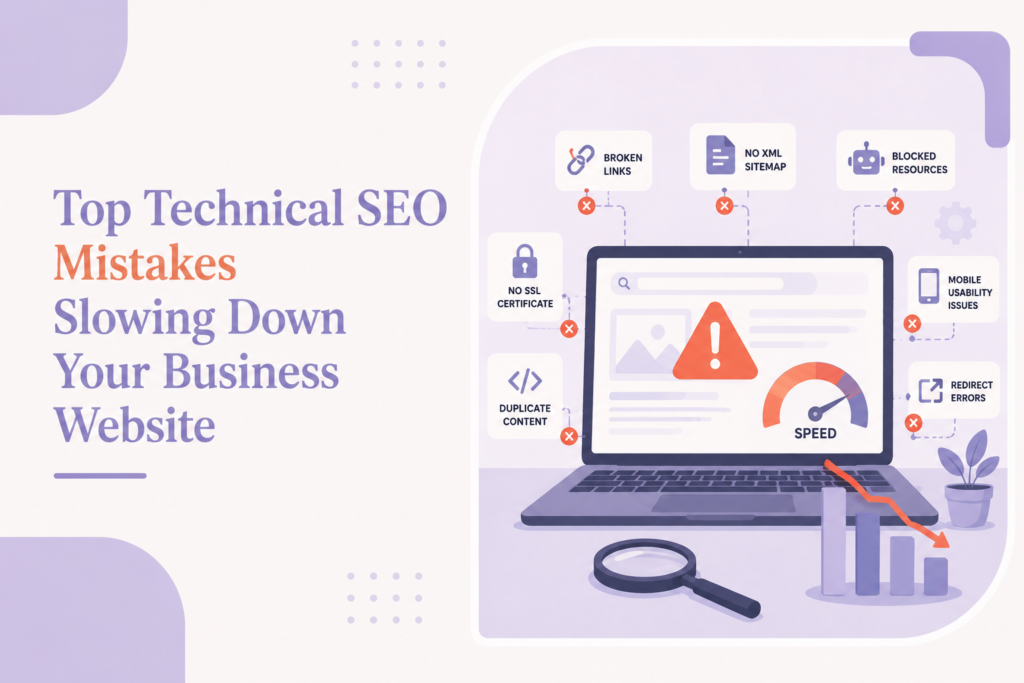
Table of Contents
- 1. Slow Website Speed
- 2. Poor Mobile Optimization
- 3. Broken Links Everywhere
- 4. Missing or Poor XML Sitemap
- 5. Indexing Issues
- 6. Duplicate Content Problems
- 7. Poor Internal Linking
- 8. Missing Structured Data
- 9. Too Many Heavy Plugins or Scripts
- 10. Ignoring Technical SEO Audits
- Final Thoughts
- Is Your Website Holding Back Your Rankings?
- Frequently Asked Questions
Let’s be real for a second.
You might have a beautifully designed website, great content, and even solid products or service, but if your technical SEO is a mess, your website could still struggle to rank on Google.
And the frustrating part? Most business owners don’t even realize technical issues are holding them back.
Technical SEO isn’t just some complicated marketing jargon. It’s basically the behind-the-scenes work that helps search engines crawl, understand, and rank your website properly. When something breaks in that process, your visibility can take a hit.
So if your website traffic has plateaued, rankings are dropping, or pages aren’t getting indexed, one (or more) of these technical SEO mistakes might be the reason.
1. Slow Website Speed
Nobody likes a slow website.
If your site takes forever to load, visitors won’t wait around, they’ll leave. Google notices that too.
A slow-loading website can hurt:
- User experience
- Bounce rate
- Conversion rate
- Search rankings
Large image files, heavy scripts, poor hosting, and unnecessary plugins are usually the biggest culprits.
A practical benchmark: your pages should load fast enough that users don’t feel the delay. Google’s PageSpeed Insights gives you a free, detailed breakdown of exactly what’s slowing your site down and how to fix it.
Keypoints: Page speed isn’t just a user experience issue, it’s a direct ranking factor. A one-second delay in load time can meaningfully reduce conversions and push your pages down in search results.
2. Poor Mobile Optimization
More people browse on mobile than desktop now.
So if users need to zoom in, struggle to tap buttons, or deal with broken layouts on mobile, that’s a problem.
Google uses mobile-first indexing, which means it primarily looks at your mobile site when evaluating rankings.
Common mobile issues include:
- Tiny text
- Broken layouts
- Slow mobile speed
- Buttons too close together
If your website feels clunky on a phone, both users and search engines are already penalising you for it. Testing your site with Google’s Mobile-Friendly Test takes less than a minute and surfaces the most critical issues immediately.
3. Broken Links Everywhere
Broken links create a poor user experience and make your website look neglected.
Imagine clicking an important page and landing on a 404 error.
Not ideal.
Internal broken links can also waste crawl budget and prevent search engines from discovering important pages.
Regular site audits help catch:
- Broken internal links
- Broken external links
- Missing pages
- Redirect loops
Fixing these issues improves both usability and crawlability.
Tip: Tools like Screaming Frog or Ahrefs Site Audit can crawl your entire website and surface every broken link in minutes. Schedule a crawl at least once a quarter.
4. Missing or Poor XML Sitemap
Think of an XML sitemap as a roadmap for search engines.
It tells Google which pages exist and which ones matter.
Without a proper sitemap, important pages may take longer to get discovered or worse, remain unindexed.
A sitemap becomes especially important for:
- Large websites
- Ecommerce stores
- Frequently updated blogs
- Service-heavy websites
If your sitemap is outdated, you’re making Google’s job harder.
5. Indexing Issues
This is one of the sneakiest SEO problems.
Sometimes pages exist, but Google simply isn’t indexing them.
That means they won’t appear in search results no matter how good the content is.
Common causes include:
- Noindex tags
- Robots.txt blocking pages
- Duplicate content
- Crawl errors
- Poor internal linking
If important pages aren’t indexed, they’re basically invisible.
Keypoint: If a page isn’t indexed, it doesn’t exist in Google’s eyes, regardless of how good the content is. Regularly checking Google Search Console for indexing errors should be a standard part of your SEO routine.
6. Duplicate Content Problems
Duplicate content confuses search engines.
When multiple pages have similar or identical content, Google struggles to understand which page should rank.
This often happens with:
- Product pages
- Filter URLs
- Category pages
- Location pages
The result? Ranking signals get split across multiple URLs.
Canonical tags can help solve this problem.
7. Poor Internal Linking
Internal links help users navigate your website and help search engines understand page relationships.
Without strong internal linking, important pages can become isolated.
This means search engines may treat them as less important.
Good internal linking helps:
- Pass authority
- Improve crawlability
- Increase time on site
- Guide users through the funnel
Think of internal links as bridges between important pages. Read more about how internal linking supports topical authority.
8. Missing Structured Data
Search engines are smart—but structured data helps them understand your content even better.
Schema markup gives extra context about:
- Services
- FAQs
- Reviews
- Articles
- Products
It can also improve how your pages appear in search results through rich snippets.
Many businesses skip schema completely, which means missed visibility opportunities.
Tip: Start with FAQ schema on your service pages and article schema on your blog posts, these are the most commonly rewarded by Google and the quickest to implement.
9. Too Many Heavy Plugins or Scripts
This is especially common on WordPress websites.
Installing too many plugins may seem harmless, but it can slow down your site, create conflicts, and hurt performance.
Extra scripts can:
- Increase load time
- Break functionality
- Create security issues
If you don’t need a plugin, remove it.
Simple usually performs better.
10. Ignoring Technical SEO Audits
Here’s the truth: technical SEO isn’t something you fix once and forget.
Websites change constantly.
New pages get added. Plugins update. Errors appear.
That’s why regular technical audits matter.
A technical audit helps identify hidden problems before they impact rankings and traffic.
Final Thoughts
Technical SEO may not be the most exciting part of digital marketing, but it plays a huge role in website performance.
You can invest heavily in content, ads, and branding , but if technical issues are slowing down your website, growth becomes much harder.
The good news? Most technical SEO issues are fixable.
Fix the foundation, and everything else becomes easier.
If your website feels slow, rankings are slipping, or traffic has stalled, it may be time for a proper technical SEO audit. At HapxDigital, technical audits are a core part of our SEO services, because maintaining a clean technical foundation is what allows every other part of your SEO strategy to actually work.
Is Your Website Holding Back Your Rankings?
Our team at HapxDigital can identify exactly what’s slowing your site down and fix it.
Frequently Asked Questions
How often should I perform a technical SEO audit?
It’s a good idea to perform a technical SEO audit at least every three to six months. If you regularly update your website or add new pages, more frequent audits can help identify issues before they affect your rankings.
Can technical SEO improve my website’s Google rankings?
Yes, technical SEO helps search engines crawl, index, and understand your website more effectively. While it’s not the only ranking factor, fixing technical issues creates a stronger foundation for your overall SEO strategy.
What’s the difference between technical SEO and on-page SEO?
Technical SEO focuses on your website’s performance, crawlability, indexing, and overall health. On-page SEO focuses on optimizing content, keywords, headings, and meta tags to improve relevance for search queries.
Do small business websites need technical SEO?
Absolutely. Whether you have a small business website or a large ecommerce store, technical SEO helps improve user experience, search visibility, and website performance, making it easier for potential customers to find your business online.
Can I fix technical SEO issues myself?
Some basic issues, such as fixing broken links or optimizing images, can be handled without advanced technical knowledge. However, more complex problems like crawl errors, schema markup, site architecture, or Core Web Vitals often require the expertise of an SEO professional.